The two side by side
| Question | Covenant Eyes | VisionShield |
|---|---|---|
| How it works | Captures screenshots on your devices and reports concerning ones to a partner | Blocks porn and makes every way out wait a day |
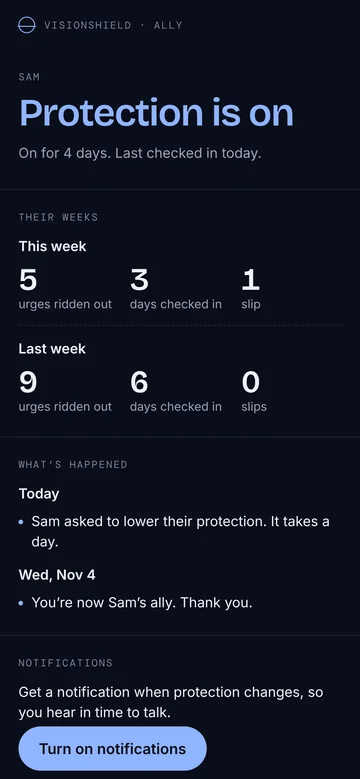
| What the other person sees | Blurred screenshots, flagged ones and a sample of others | Whether protection is on, and weekly counts |
| Your browsing or screen leaves the phone | As blurred screenshots | Never |
| Blocking | Optional, for known porn sites | Always on, in every app and browser |
| In a weak moment | Your partner may see it afterwards | Any way out takes 24 hours |
| Learns your hardest hours | No | Yes, and tightens quietly before them |
| Help in the moment | Reports and a partner | Urge timer, breathing, your own reason, a plan |
| Account | Yes | No |
| Computers | Yes | Windows, in testing. Mac later |
Covenant Eyes fits if
- You want someone to see what you actually look at
- You need a Mac covered as well as your phone
- Your church or group already uses it together
VisionShield fits if
- Being watched makes you hide, not change
- You want blocking you can’t undo on impulse
- Your hard moments are late at night, on your phone
- You want an ally who hears in time to talk
Why we don’t take screenshots
Screenshots can catch things a blocker misses, and for some people knowing someone will see helps. But it’s a lot to hand over. Everything else on your screen is captured too, your messages and your banking included, and a blurred sample of it goes into the reports. A partner can end up reviewing your life rather than talking about how you’re going.
We went with time instead. Anything that weakens protection waits a day, so the urge has usually passed before the way out opens. If you have an ally, they hear about it when you ask, a full day before anything changes. That’s when a conversation can still help.
Switching over
Tell your partner first
Tell them what’s changing and why. If they’re going to be your ally, they’ll see less than before, but they’ll hear about things sooner.
Remove Covenant Eyes
Follow Covenant Eyes’ own steps, so its filter and VPN settings come off cleanly and don’t fight the new one.
Set up VisionShield
Two questions, then protection. It takes a few minutes and there’s no account to make.
Send your ally the link
It’s a private link, so they don’t need the app or an account. What allies see.
Questions
Is VisionShield an accountability app?
Partly. It’s a blocker first. The ally is optional, and they see whether protection is on and how your week went, never your screen or your browsing.
Does VisionShield take screenshots?
No, never. It doesn’t read, record or capture what’s on your screen, and nothing about your browsing leaves the phone.
Can I use both?
You can, though most people won’t need to. Running two filters on one phone can make them fight over DNS settings, so pick one for blocking.
Does VisionShield work on computers?
On Windows, yes: it’s in testing now, with the same filter on every connection and the same day’s wait, linked to your phone. A Mac version comes later. If you mainly struggle on a Mac today, a desktop blocker covers that and VisionShield doesn’t yet.
Covenant Eyes is a trademark of its owner. VisionShield isn’t connected with it. Details about Covenant Eyes come from covenanteyes.com as of November 2026 and may change; check there for current features and prices.